We are using cookies to give you the best experience on our website. If you want to know more, please read the Cookie Policy.

Magento 2 SEO Templates Extension
The SEO Templates Extension for Magento 2 automates the generation of SEO attributes (Meta Title, Meta Description, Meta Keywords) for products and categories using customizable templates. Build templates with product/category attributes and configuration settings to create consistent, optimized metadata across your entire catalog - saving hours of manual work.
Key Technical Features
Create SEO templates for products and categories with dynamic variables
Assign products to templates using flexible rule-based conditions
Apply templates to all categories or select specific ones
Generate Meta Title, Meta Description, and Meta Keywords automatically
Set attribute values for specific Store Views or Global Scope
Use product/category attributes and store configuration values as template variables
Include conditional logic (IF) and randomization (RANDOM) in templates
Schedule automatic template application via cron jobs
Manage templates efficiently using CLI commands
Special Price
$35.00
Regular Price
$59.00
Free
Support
Free
Updates
30-day
Money back
Extension Screenshots
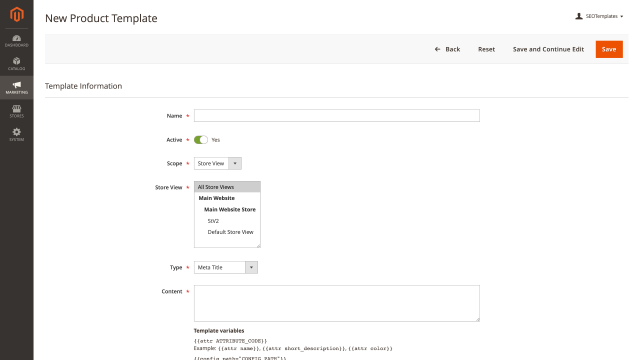
Automated SEO Metadata Generation
The extension enables you to create reusable templates for generating SEO metadata across your product and category pages. Instead of manually entering Meta Title, Meta Description, and Meta Keywords for each item, define templates once and apply them automatically to matching products and categories. This dramatically reduces the time required to optimize your catalog while ensuring consistency across your store.
Flexible Product Assignment
Assign products to templates using powerful condition-based rules. Define criteria based on product attributes, categories, price ranges, or any other product properties. Products matching your conditions are automatically assigned to the template, and their metadata is generated accordingly. As new products are added to your catalog, they're automatically processed if they meet the template conditions.
Category Template Control
Choose whether to apply templates to your entire category structure or select specific categories. This flexibility allows you to create different SEO strategies for different sections of your store while maintaining automated efficiency.
Multi-Store and Scope Management
Generate SEO attributes for specific Store Views or at the Global Scope level. Each template can target a particular scope, giving you precise control over metadata across different languages, regions, or store configurations. This is essential for international stores that need localized SEO content.
Dynamic Template Variables
Build sophisticated templates using dynamic variables pulled from your product and category attributes. Include product names, SKUs, prices, categories, brands, or any custom attributes you've created. Store configuration settings are also available as variables, allowing templates to reference store-specific information like store name or contact details.
Example Product Template: {{attr name}} - Buy Online at {{cоnfig path="general/store_information/name"}} | Free Shipping
Example Category Template: Shop {{attr name}} - Premium Quality at Best Prices
Smart Conditional Logic
Use IF expressions to create intelligent templates that adapt based on available data. The IF expression excludes portions of the template when referenced attributes have no value, preventing awkward gaps or placeholder text in your metadata.
Example: {{attr name}}[[if by {{attr brand}}]] - Buy Online
If a product has no brand set, the template automatically omits that section rather than showing empty text.
Content Randomization
Add variety to your metadata with RANDOM expressions. Define multiple variations, and the extension randomly selects one when generating the final value. This is particularly useful for creating diverse meta descriptions that avoid duplicate content issues while maintaining SEO quality.
Example: [[random Buy|Shop|Purchase|Get]] {{attr name}} [[random today|now|online]]
This generates variations like "Buy Product Name today" or "Shop Product Name online".
Automated Scheduled Application
Configure templates to apply automatically on a schedule using cron jobs. Enable the "Apply by Cron" setting for any template, and the extension will regularly process matching products and categories, keeping your SEO metadata up-to-date without manual intervention. This is especially valuable for stores with frequently changing inventory or pricing.
Command-Line Management
For developers and advanced users, the extension provides CLI commands for complete template management. View all templates, apply specific templates by ID, or delete outdated templates directly from the command line. Run commands for individual templates or execute operations across all templates simultaneously - perfect for deployment scripts and automated workflows.
Complete SEO Solution
The SEO Templates Extension integrates seamlessly with our other SEO tools. For comprehensive SEO optimization across your entire Magento 2 store, consider using the complete Magento 2 SEO Extension, which includes this functionality along with additional SEO features.
Benefits for Your Business
- Save Time: Generate metadata for thousands of products in minutes instead of hours
- Ensure Consistency: Maintain uniform SEO standards across your entire catalog
- Improve SEO: Well-structured, keyword-rich metadata improves search rankings
- Scale Easily: Automatically process new products as your catalog grows
- Reduce Errors: Eliminate typos and inconsistencies from manual data entry
- Multi-Language Support: Efficiently manage SEO for international stores
Perfect For
- Stores with large product catalogs requiring bulk SEO optimization
- Multi-language or multi-store Magento installations
- Businesses launching new product lines regularly
- Stores migrating from other platforms needing quick SEO setup
- E-commerce managers looking to automate repetitive SEO tasks
Transform hours of manual SEO work into minutes with automated template-based metadata generation.
Write Your Own Review